 cockpit

Home
KPI tiles, the next move with its choices as buttons, agents by stage; Up next, Apps and Activity.
A layout and a mod for the Herdr desktop app: Home, a sidebar of agents, every app as a view.
/cockpit:setup or cockpit setup installs it.
Every view on the acme demo; notifications are a TUI shot.
KPI tiles, the next move with its choices as buttons, agents by stage; Up next, Apps and Activity.

Agents as floating cards with CPU and memory; questions answered in the sidebar; tabs and spaces name themselves.

Documents, Review, Runbook, Files and Changes beside the agent; it draws figure tiles, area, donut and bar charts unasked.

The agent's plan as a diagram it keeps current. Click a box to ask for a change.

Read and edit a file next to the agent; its edits show live, ⌘S saves. Ask the agent about any lines.

Uncommitted, branch or PR, side by side or unified, a click from the agent.

Comment line by line, then Submit review sends every note to the agent as one message.

The diff explained in reading order, steps you can follow, untested parts called out.

Alerts, reviews, your PRs, tickets and cleanup; merge, or start an agent in a worktree.

⌘⇧P: Herdr's commands plus everything cockpit knows, history and past sessions.

⌘R: agents by stage with their question and recap; prompts queue for a busy one.

The steps left to ship a ticket, each with its PR, deploy or command to run.

Your list, with the tickets and links it mentions.

Your week as a list, day or week, with join and a prepared brief.

Your inbox, unread above read, each thread opened beside the list.

Each release judged on errors and latency, from Datadog.

Agent prompts and scripts on a schedule or an event; each run's output as Markdown.
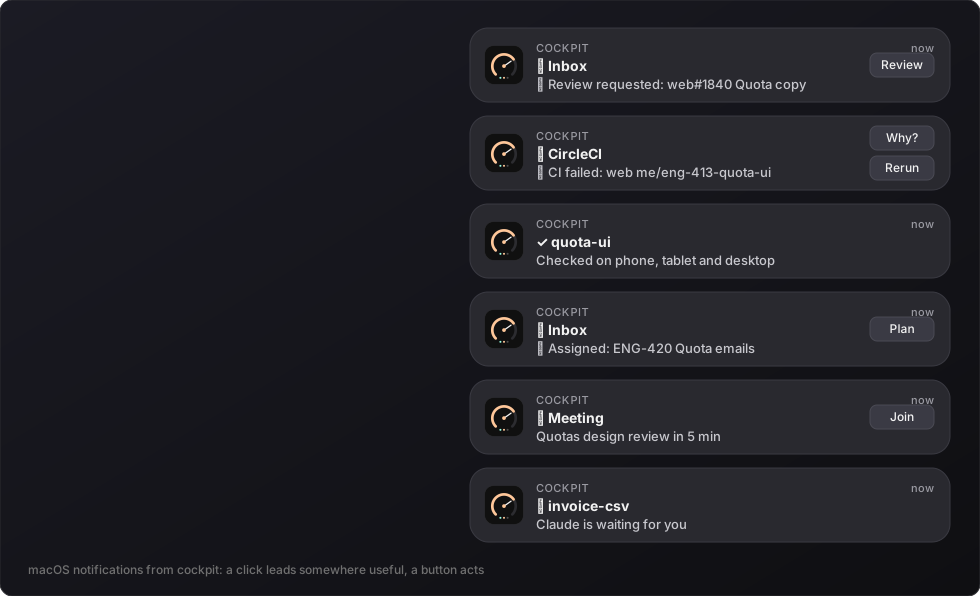 TUI shot
Herdr's toast in front, the system's otherwise; a click opens the row it is about.
Every app keeps its TUI keys, plus buttons and right-click menus.
| ⌘⇧P | Palette |
| ⌘⌥0 | Home ↔ work |
| ⌘⌥1 … ⌘⌥6 | Inbox, runbook, to-do, meetings, monitor, routines |
| ⌘⌥A | The focused agent alone |
| ⌘⌥B | Side panel |
| ⌘J | Next agent waiting |
| ⌘G · ⌘L | The agent's PR · ticket |
| ⌘R | Recap of every agent |